
I’ll start with Claude’s conclusion after I asked for the refactor:
 Perfect! All tests pass. This is a huge improvement - the Territory config now uses semantically meaningful names:

  What We Accomplished

  Before (confusing):
  {
    "first_visitor_points": 100,      // Wait, do I gain or lose points?
    "subsequent_visitor_points": -20   // Negative means... rent? Cost? Loss?
  }

  After (crystal clear):
  {
    "ownership_cost": 100,  // Cost to claim - I pay 100 points
    "visit_cost": 20        // Cost to visit - I pay 20 points (goes to owner)
  }

  Key Benefits:
  1. ✅ No more sign confusion - all values are positive costs
  2. ✅ Semantic clarity - "cost" clearly means points you pay
  3. ✅ Strategy handles signs - the Territory strategy converts costs to negative when applying them

  This is the power of the Strategy Pattern - we can have domain-appropriate terminology for each game type! Score
  Attack uses "points" (gains), Territory uses "costs" (losses). Beautiful! 🎉
Before Refactor
My WhatsApp Urban Wide-Game Bot had a game table and controls table, both of which stored scoring information in two fields:
- First Visitor Points
- Subsequent Visitor Points
This reduced flexibility. What if I want a depreciating list, for example [30,20,15,10,5,0,0,0,0.....]? How do I store that? It also produced confusion. One of my current game types, which Claude has insisted on calling “Score Attack”, is like a traditional Score Orienteering competition. Players gain points for visits. The other, more often played by the Scouts, has an ownership semantic. It costs points to claim territory, but then you earn points whenever another team visits.
A big issue I had throughout the code was getting myself (and Claude) to understand whether First Visitor Points and Subsequent Visitor Points should be positive or negative and what the signs meant. Now I have different game strategies each with their own JSON configuration in the database I can make the fields meaningful.
After Refactor
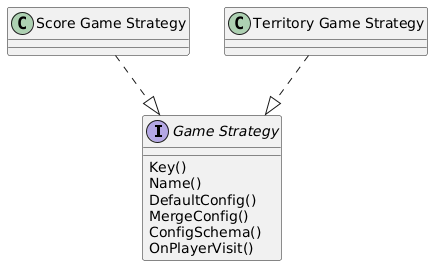
The entire knowledge of how to play each game type is contained in its Strategy implementation. That is the beauty of the Strategy Pattern. Anything I want to know about a Territory Game is in one place.
Another advantage of Strategy, a traditional advantage, is that I can split off behaviours into different strategies. Let’s say I wanted different types of game ending? I could have an Ending Strategy. I could have a Team Signup Strategy. I then combine my selection into a single game.
Here’s the Strategy Interface so far:
// Strategy defines the interface for game type behavior
type Strategy interface {
	// Key returns a unique identifier for the game type
	Key() domain.GameType

	// Name returns the name of the game type as would be displayed to the user.
	Name() string

	// GameMechanicsText returns a description of the game mechanics for use in an AI assistant
	GameMechanicsText() string

	// DefaultConfig returns the default scoring configuration for this game type.
	// This is used when creating new games or when config parsing fails.
	DefaultConfig() ScoringConfig

	// ParseConfig parses a JSON configuration into a typed config struct.
	// Returns the strategy's default config on parse errors (graceful degradation).
	// Handles unknown fields gracefully for backward compatibility.
	ParseConfig(config json.RawMessage) (ScoringConfig, error)

	// ConfigSchema returns a JSON schema describing the configuration fields
	// for this game type. Used to dynamically generate AI tool schemas.
	// Only includes semantic fields (not internal fields like version).
	ConfigSchema() map[string]interface{}

	// MergeConfig merges partial configuration updates with the current config.
	// Used by AI tools to apply partial updates without replacing the entire config.
	// Returns the complete merged configuration as JSON.
	MergeConfig(current json.RawMessage, updates map[string]interface{}) (json.RawMessage, error)

	// FormatScoringDescription returns a human-readable one-line description
	// of the scoring configuration. Used in AI assistant context and game info displays.
	// Example: "First visitor=+50 pts | Subsequent visitor=+10 pts"
	FormatScoringDescription(config ScoringConfig) string
}I’ll add a HandleVisit() method when I implement game play. This still needs to be refined. It cannot know about WhatsApp, so must communicate its reply in terms of who is awarded what score. Then the business layer would apply the scores and the presentation layer will inform the users through their appropriate channels. All this to come!
To show the variation, here’s the AI Tool schema for the Territory Strategy
// ConfigSchema returns the JSON schema for Territory configuration
func (s *TerritoryStrategy) ConfigSchema() map[string]interface{} {
	return map[string]interface{}{
		"type": "object",
		"properties": map[string]interface{}{
			"ownership_cost": map[string]interface{}{
				"type":        "integer",
				"description": "Cost in points to claim a checkpoint (positive value, will be deducted from claimer's score)",
				"minimum":     0,
			},
			"visit_cost": map[string]interface{}{
				"type":        "integer",
				"description": "Cost in points when visiting an owned checkpoint (positive value, will be deducted from visitor and transferred to owner)",
				"minimum":     0,
			},
		},
		"required": []string{},
	}
}And here for the Score Attack (Score Orienteering) game
func (s *ScoreAttackStrategy) ConfigSchema() map[string]interface{} {
	return map[string]interface{}{
		"type": "object",
		"properties": map[string]interface{}{
			"first_visitor_points": map[string]interface{}{
				"type":        "integer",
				"description": "Points awarded to the first team to visit a checkpoint",
			},
			"subsequent_visitor_points": map[string]interface{}{
				"type":        "integer",
				"description": "Points awarded to other teams visiting the checkpoint",
			},
		},
		"required": []string{},
	}
}
Leave a Reply